About the program
About
OneKey is an enterprise password manager for centralized storage, protection, and secure sharing of credentials and sensitive information.
PMS
Password Management System
On-Premise / SaaS
Deployment options
ГОСТ 34.12-2018
Encryption support
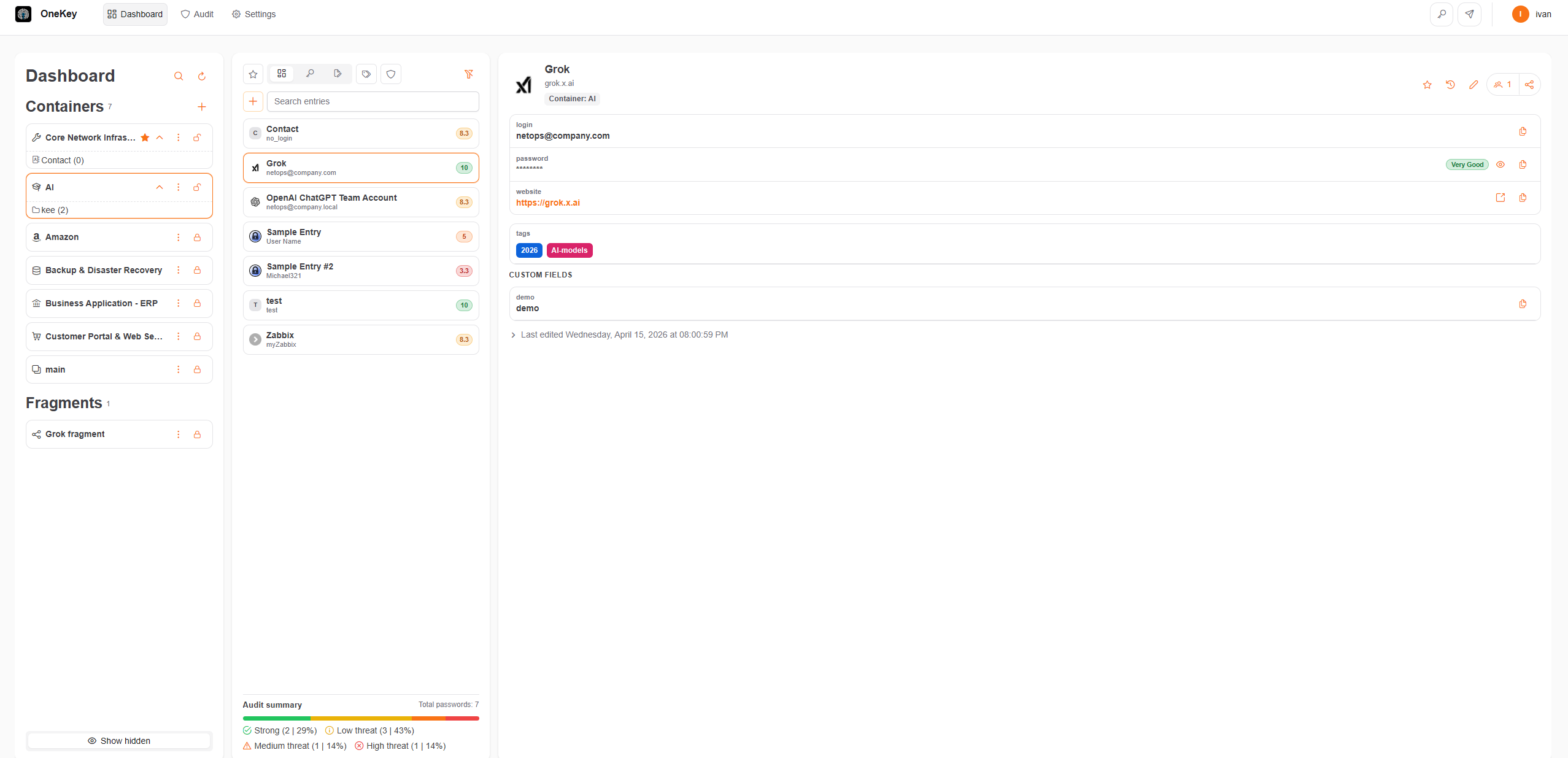
Interface
Main OneKey UI areas
Hover highlighted regions to learn what each part of the interface does.
Tools
Built-in password generator and parcels
Filtering and search
Search bar and filters for vault content
Actions
Quick actions for the current vault item
Purpose
Key capabilities
Password management
OneKey provides centralized storage, creation, updates, and deletion of passwords used across your organization.
User authentication
The system verifies credentials and enforces access controls for protected information.
Security policies and recommendations
Apply corporate requirements for passwords, two-factor authentication, and other protection settings.
Audit and reporting
User actions are recorded so audit logs can be used for oversight and incident investigation.
Overview
About OneKey
What is OneKey for?
OneKey is software classified asPMS (Password Management System) — an enterprise password manager.
It is designed for centralized password storage and access to systems and services used by employees.
It is designed for centralized password storage and access to systems and services used by employees.
How can OneKey be deployed?
The system can be deployed on your local infrastructure (On-Premise) or provided as SaaS-решения.
You can install it on your own infrastructure or use a dedicated isolated environment prepared by our team.
You can install it on your own infrastructure or use a dedicated isolated environment prepared by our team.
How is data security ensured?
OneKey encrypts data usingГОСТ 34.12-2018 The algorithm can be replaced with another used in your organization if required.
Data is accessible only with the correct master password. A two-level encryption approach is used on devices, on the server, and in transit.
Data is accessible only with the correct master password. A two-level encryption approach is used on devices, on the server, and in transit.
Does OneKey have access to user data?
No. OneKey follows a zero-knowledge policy.
That means user data is not accessible even to the vendor. Data stays under the owner's control.
That means user data is not accessible even to the vendor. Data stays under the owner's control.
What happens if the master password is lost?
OneKey never stores the full master password on devices or in the cloud. Without it, data cannot be decrypted.
For such cases a decentralized recovery system is available and should be configured in advance.
Learn more about recovery
For such cases a decentralized recovery system is available and should be configured in advance.
Learn more about recovery
Is there a password generator in OneKey?
Yes. The product includes an built-in password generator and passphrase support, with control over length, case, digits, and symbols.
Architecture
Software architecture
OneKey uses a three-tier model with a thin web client for cross-platform access in a modern browser.
- Client tier (thin web client)
- Application server
- Database server
You can deploy on a VM or split components across separate servers.
Security
Security in OneKey
User data is protected with modern cryptography and organizational security measures.
- Encryption per GOST 34.12-2018
- Data access only with the master password
- Zero-knowledge policy
- Two-factor authentication support
- Decentralized recovery system
Requirements
Technical requirements
Application server sizing depends on user count and expected load.
Up to 50 users
CPU 2 coresRAM 2 GBDisk 20 GB SSD
Up to 100 users
CPU 2 coresRAM 4 GBDisk 50 GB SSD
Up to 500 users
CPU 6 coresRAM 16 GBDisk 500 GB SSD
Up to 1,000 users
CPU 16 coresRAM 32 GBDisk 2 TB SSD
Up to 10,000 users*
CPU 18 coresRAM 64 GBDisk From 5 TB SSD
Recommendation
For large deployments, run the application server and database server on separate hosts
Architecture
Component interaction diagram
Below is how a user request flows through the browser, reverse proxy, frontend, backend, and database.
Linux VM
User
Browser
Nginx
Reverse Proxy
Reverse Proxy
Frontend
Backend API
PostgreSQL